
At a glance
For: IT leads, platform engineers and builders who want a coding agent on a repo without handing it a key · Setup time: about an hour, if you avoid the pitfalls below · Stack: Claude Console (workload identity federation), anthropics/claude-code-action@v1, Claude Haiku 5.5, Playwright MCP 0.0.83, GitHub Pages
Last verified: 2026-10-20
You open a GitHub issue and write @claude and what you want. Within a minute or two Claude has read the repo's rules, changed the site, run the design check, taken screenshots before and after, and opened a pull request. You merge, and GitHub Pages publishes the change. No API key exists anywhere: GitHub's short-lived identity token is swapped for a 10-minute Claude token, and a US$20 monthly cap stops anything that would cost more.
Everything below runs in a public repo you can copy: governed-agent-starter, with its live demo site.
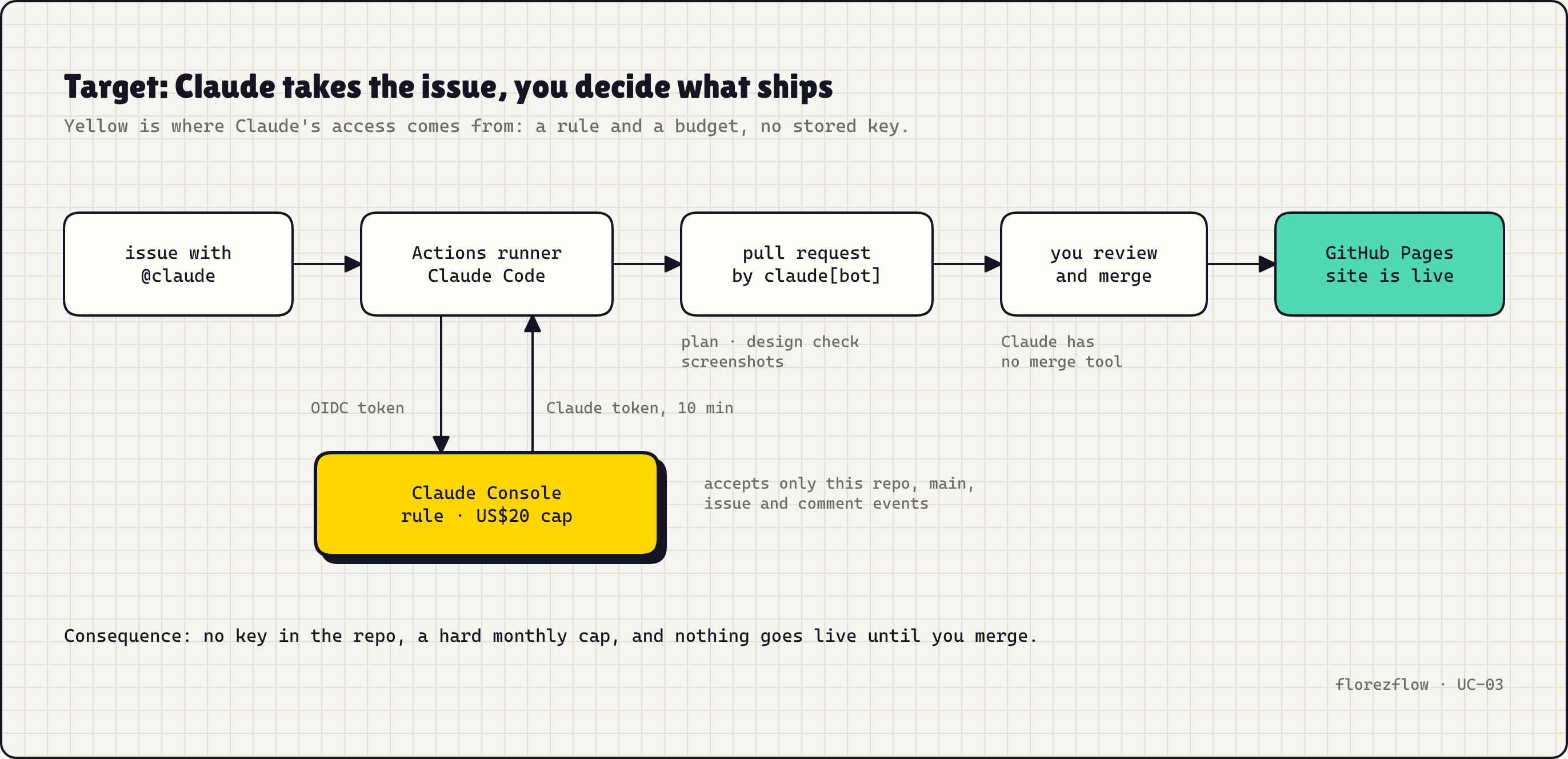
The problem: agents on GitHub run on stored keys
Most guides for an AI agent in GitHub Actions start with the same step: create an API key and store it as a repository secret. It works, and it is the fastest way to a first run. The key then lives until someone revokes it. It pays for whatever it is used for, from any machine. Anyone who can change a workflow file can send it somewhere else.
The agent itself is the second problem. It gets write access to the repo, and nothing in the setup says where it may work, what it must never touch, or that a person decides what ships. A lower limit on a second key fixes neither.
This setup replaces the key with an identity check and puts the rules in the repo, where the agent reads them and can't change them. I built it on my own Claude Console organisation and GitHub account in October 2026; the screenshots are from that build.
Steps: an agent on your issues in 10 steps
Steps 1 to 3 happen in the Claude Console, 4 to 9 on github.com, and step 10 is the first real task.
1. Create a workspace with a spend cap
In the Claude Console, open Settings → Workspaces and create a workspace for the agent only. Mine is called governed-agent-starter. A separate workspace means its limit, its rate limits and its usage report describe the agent and nothing else, and a runaway run can't drain your other work.
Open Spend limits and set a monthly limit. I set US$20 with an email at US$10. Hitting the limit fails the run, which is the safe way to fail.
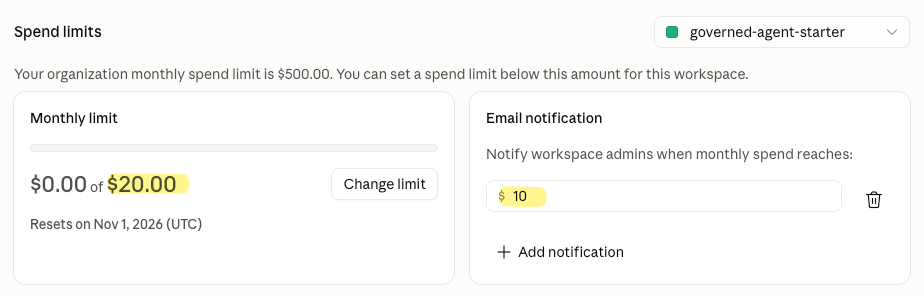
Two more settings on the same workspace:
- Rate limits: set models you don't want the agent to use to 0. I set Claude Fable 5 to 0, so a typo in a model name can't reach the most expensive model.
- Credit: buy a small amount of credit for the organisation and leave auto-reload off. The monthly API credit that comes with Claude Max and Team plans doesn't cover runs started by the Claude Code GitHub Action; Anthropic counts them as Claude Code usage.
2. Connect GitHub as a workload
Open Settings → Workload identity and click Connect workload. Workload identity federation means the Console trusts a token that GitHub signs for each run, instead of a key you store. The wizard offers six identity providers; choose GitHub Actions.
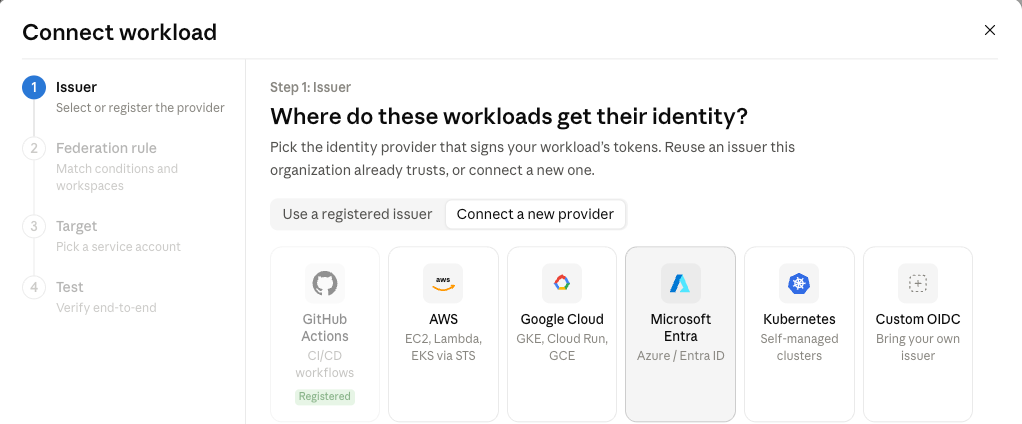
The guided fields ask for the GitHub organisation (or user), the repository, the branch (refs/heads/main) and the organisation's numeric ID. Fill in the numeric ID, because it survives a rename and a name doesn't. You find it at https://api.github.com/users/<name>.
Allowed events offers only "Only push" or "All". Neither fits: an @claude comment runs as an issue_comment event, so "Only push" refuses every agent run, and "All" accepts runs you never meant to pay for. Step 3 fixes that.
3. Tighten the rule in Advanced match options
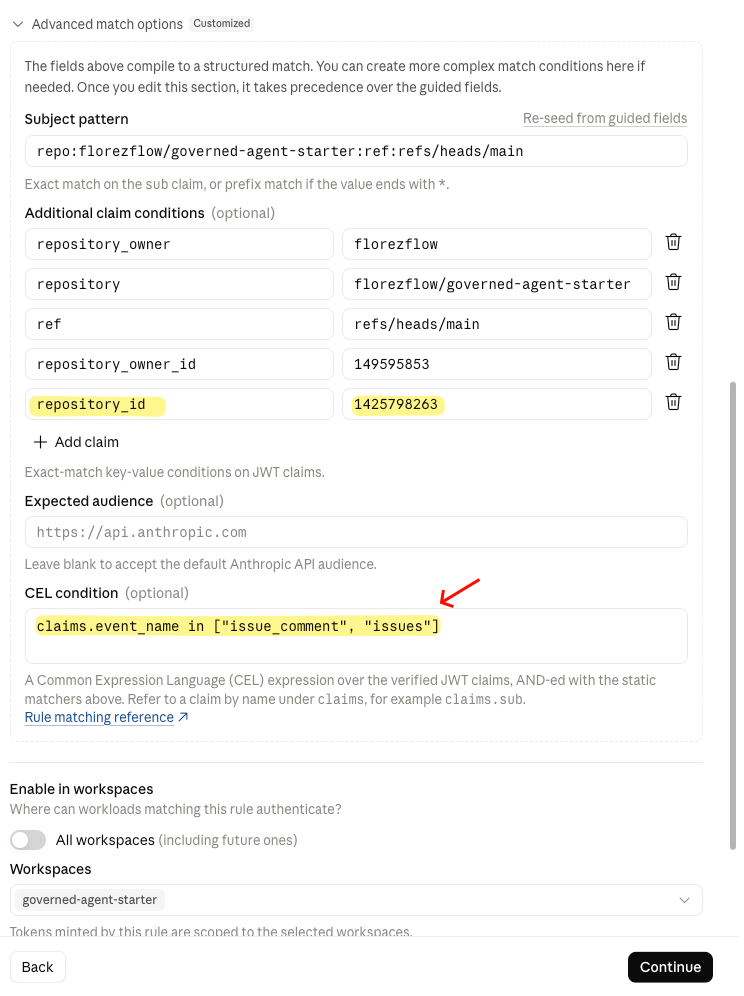
Open Advanced match options. Once you edit this section, it overrides the guided fields. Set four things:
subject    repo:<owner>@<owner-id>/<repo>@<repo-id>:ref:refs/heads/main
claims     repository_owner, repository, ref, repository_owner_id, repository_id
audience   (blank: the default https://api.anthropic.com)
CEL        claims.event_name in ["issue_comment", "issues"]
The CEL condition (a short expression over the token's claims) lets only comment and new-issue runs through. The two ID claims pin the rule to this repository even if it is renamed. Under Enable in workspaces, pick the agent's workspace only.
Check the subject against a real token before you trust it. The wizard prefills the classic form repo:<owner>/<repo>:ref:refs/heads/main, and so does Anthropic's GitHub page. My repository's tokens carry the IDs in the subject, so the prefilled pattern never matched. Step 6 shows how to see which form yours uses.
Then choose Create a new one under Target. The service account is the identity the run assumes; mine is governed-agent-starter-ci. The last wizard step shows a test snippet with four IDs filled in: the federation rule (fdrl_…), the organisation, the service account (svac_…) and the workspace (wrkspc_…). Copy them.
4. Install the Claude GitHub App on one repository
Install the Claude GitHub App from https://github.com/apps/claude and choose Only select repositories. The app's token lets Claude push a branch, comment and open pull requests. Commits made with the workflow's own GITHUB_TOKEN don't start other workflows, so the design check would never run on the agent's pull requests.
5. Add the four IDs as repository variables
In the repository, open Settings → Secrets and variables → Actions → Variables and add:
ANTHROPIC_FEDERATION_RULE_ID    fdrl_…
ANTHROPIC_ORGANIZATION_ID       the organisation's UUID
ANTHROPIC_SERVICE_ACCOUNT_ID    svac_…
ANTHROPIC_WORKSPACE_ID          wrkspc_…
They are variables, not secrets, because they are identifiers: without a GitHub token from this repository, branch and event they get nobody a Claude token. GitHub prints them in every run log, so don't treat them as hidden either. Add them before you merge any workflow that uses them.
6. Test the rule from both sides
A rule is only proven when it accepts what it should and refuses what it should, for the right reason. The kit's wif-smoke-test.yml asks GitHub for a token with core.getIDToken('https://api.anthropic.com'), prints the claims the rule matches on, exchanges the token at https://api.anthropic.com/v1/oauth/token, and makes one billed call of a few tokens with the agent's model:
- A push to main must be refused, because the CEL condition only allows comment and issue events.
- A
/wif-testcomment by the owner must be accepted, and the billed call must succeed.
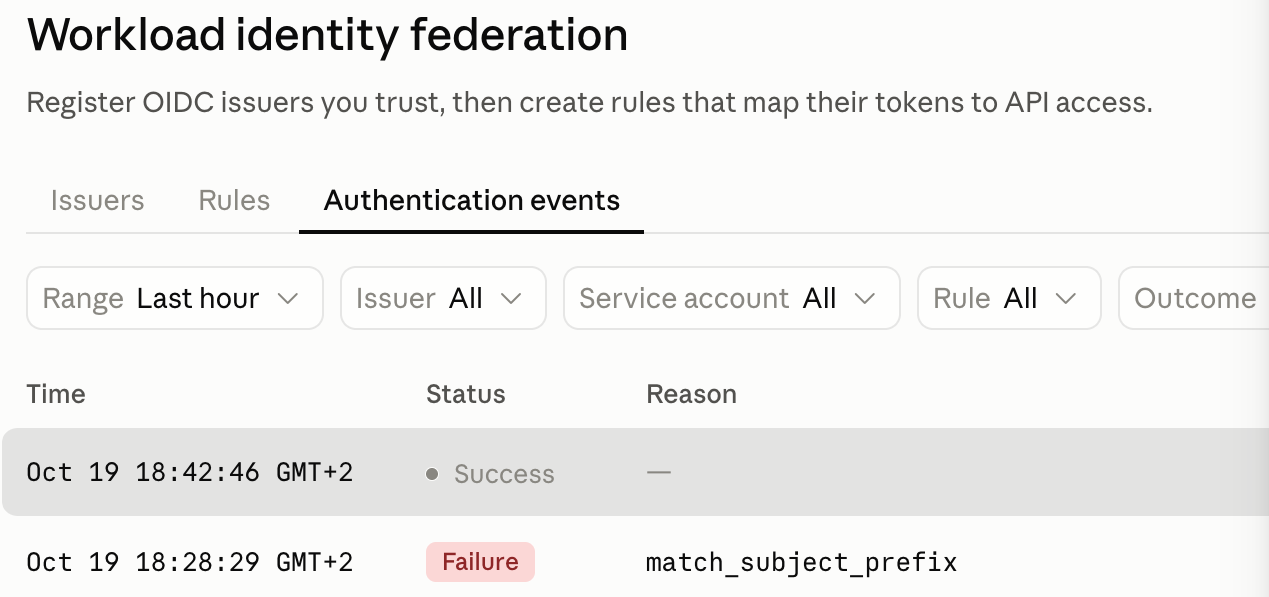
Then open Workload identity → Authentication events in the Console. Every attempt is there, with the full subject GitHub sent and the reason for a refusal. My first refusal said match_subject_prefix: the right answer for the wrong reason. After I changed the subject to the ID form, the push was refused with match_condition_false (the event check) and the comment run succeeded.
7. Add the agent workflow
.github/workflows/claude.yml starts on issue_comment and issues, and only when the text contains @claude and the author has write access (OWNER, MEMBER or COLLABORATOR). It needs id-token: write to ask GitHub for the token. The core of it:
- uses: anthropics/claude-code-action@v1
  with:
    anthropic_federation_rule_id: ${{ vars.ANTHROPIC_FEDERATION_RULE_ID }}
    anthropic_organization_id: ${{ vars.ANTHROPIC_ORGANIZATION_ID }}
    anthropic_service_account_id: ${{ vars.ANTHROPIC_SERVICE_ACCOUNT_ID }}
    anthropic_workspace_id: ${{ vars.ANTHROPIC_WORKSPACE_ID }}
    claude_args: |
      --model claude-haiku-5-5
      --max-turns 40
      --allowedTools "Skill,Bash(node scripts/check-design.mjs),Bash(git status),Bash(git diff *),mcp__playwright__browser_navigate,mcp__playwright__browser_take_screenshot,mcp__github__create_pull_request,mcp__github__update_pull_request"
      --append-system-prompt "For any change to the website, use the site-change skill. Open the pull request yourself with mcp__github__create_pull_request. Never merge."
The full file in the kit lists a few more Playwright and git tools. Around this step it serves site/ on localhost:4173, so Claude can take screenshots, and downloads the pinned Playwright MCP once, so it starts in time. The job has a 20-minute timeout and one run per issue at a time. I use Haiku 5.5, the cheapest model; for larger changes across several files, switch to claude-sonnet-5-5.
8. Write the rules the agent reads
Five files decide how the agent works. It reads them at the start of every run:
CLAUDE.md: stay insite/andscreenshots/, use the skill for every site change, open the pull request yourself, never merge, no secrets.DESIGN.md: the design language, with four rules thatscripts/check-design.mjschecks on every pull request (tokens only, one yellow element, no requests to other sites, basic HTML hygiene)..claude/skills/site-change/SKILL.md: the order of work: plan, screenshot before, change, design check, screenshots on desktop and phone, commit, push, open the pull request with the screenshots embedded..claude/settings.json: the same tool allow list, plus deny rules for the agent's own guardrails..mcp.json: Playwright MCP, headless Chrome at 1280×800.
The deny rules are the part that keeps the agent out of its own rules:
"deny": [
  "Edit(/.github/**)", "Edit(/.claude/**)", "Edit(/CLAUDE.md)",
  "Edit(/.mcp.json)", "Edit(/scripts/**)",
  "Read(.env)", "Read(**/.env.*)",
  "Bash(curl *)", "Bash(wget *)", "WebFetch", "WebSearch"
]
9. Publish with GitHub Pages on merge
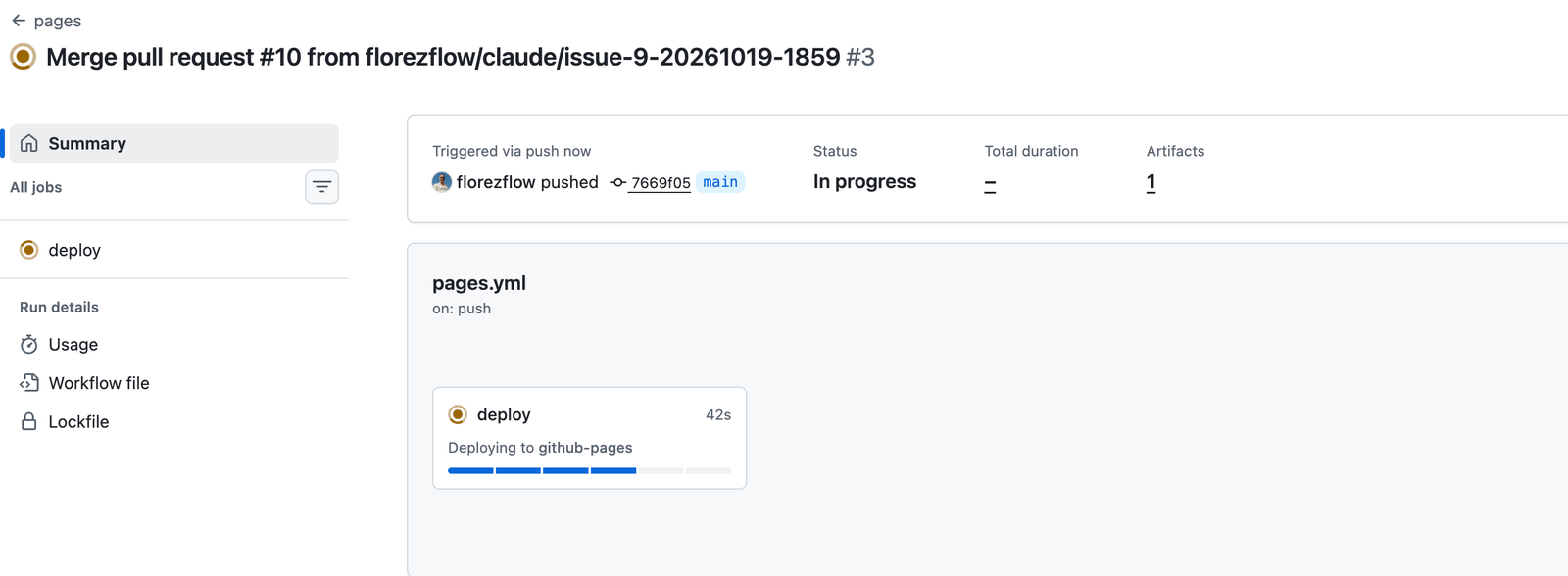
Open Settings → Pages and set the source to GitHub Actions. pages.yml runs on every push to main that touches site/: it runs the design check again, then actions/configure-pages@v6, actions/upload-pages-artifact@v5 and actions/deploy-pages@v5. Merging the agent's pull request is the only step that makes a change public. A second workflow, checks.yml, runs the design check on every pull request.
10. Write @claude in an issue
Open an issue. The mention can go in the body, in a comment, or in the title:
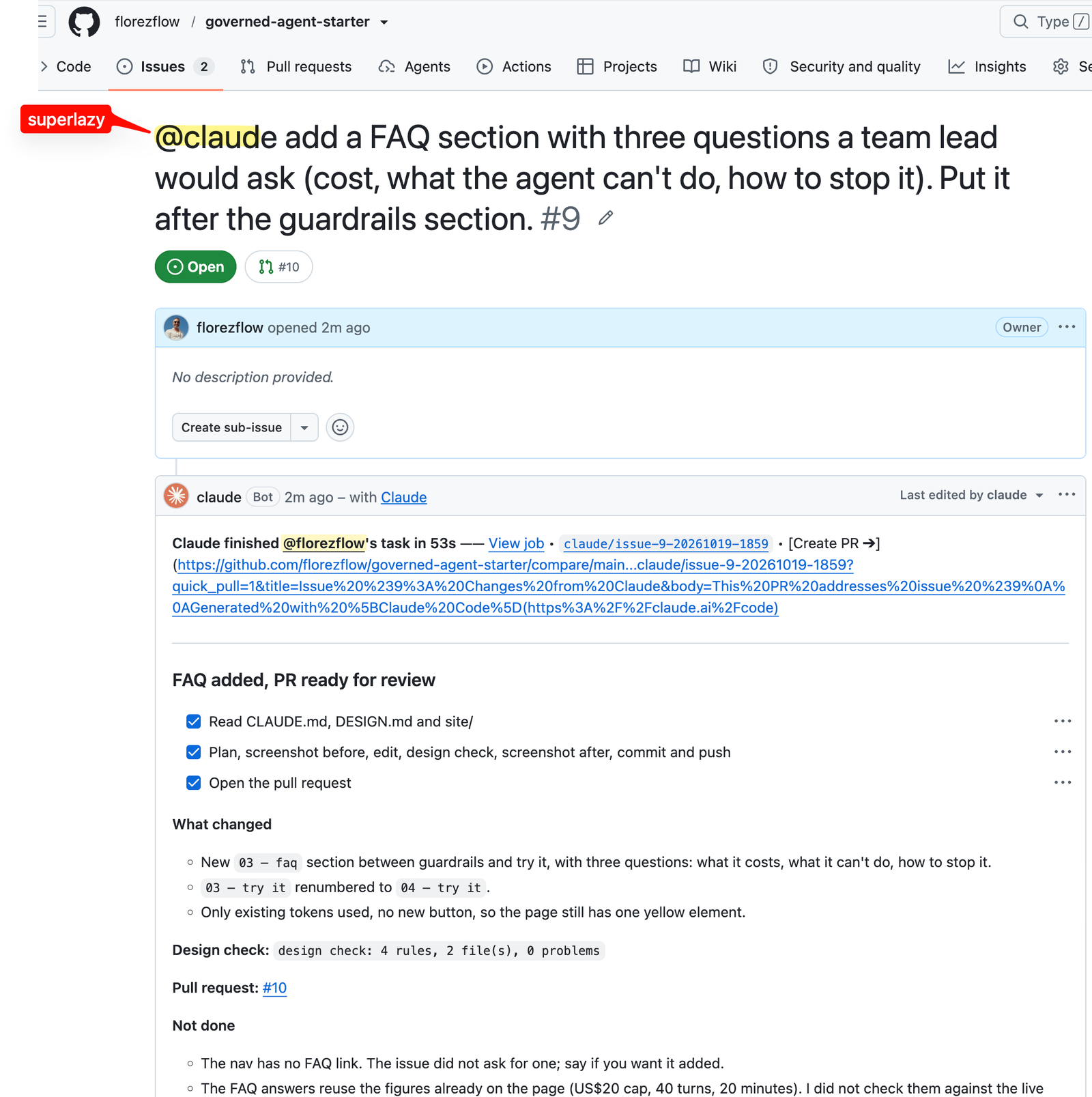
Claude answers in a comment that it updates as it works. It finished this one in 53 seconds and opened pull request #10 as claude[bot], with the plan, the changed files and the design check result:
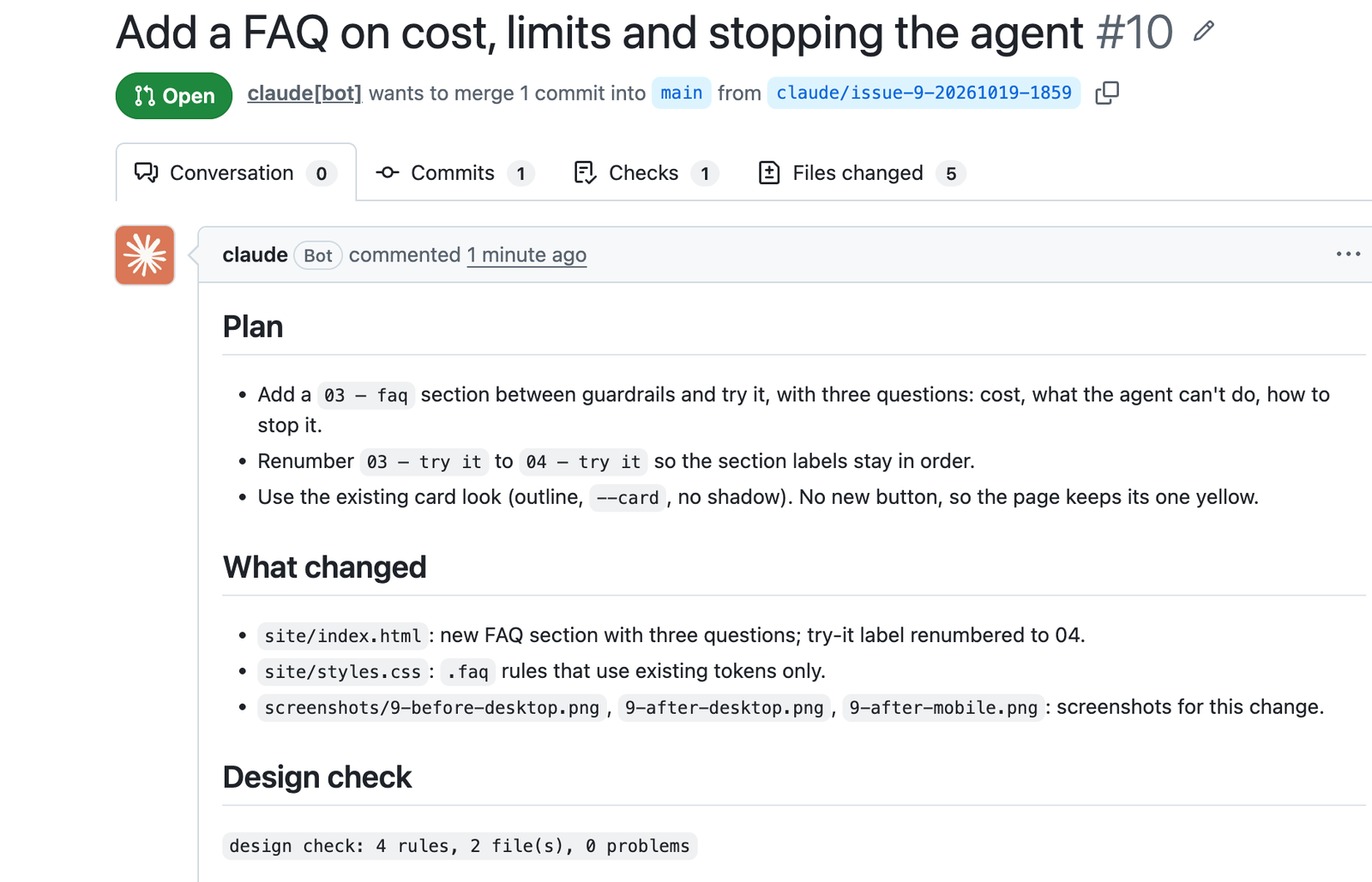
The screenshots are in the description, so you review the change without checking out the branch:
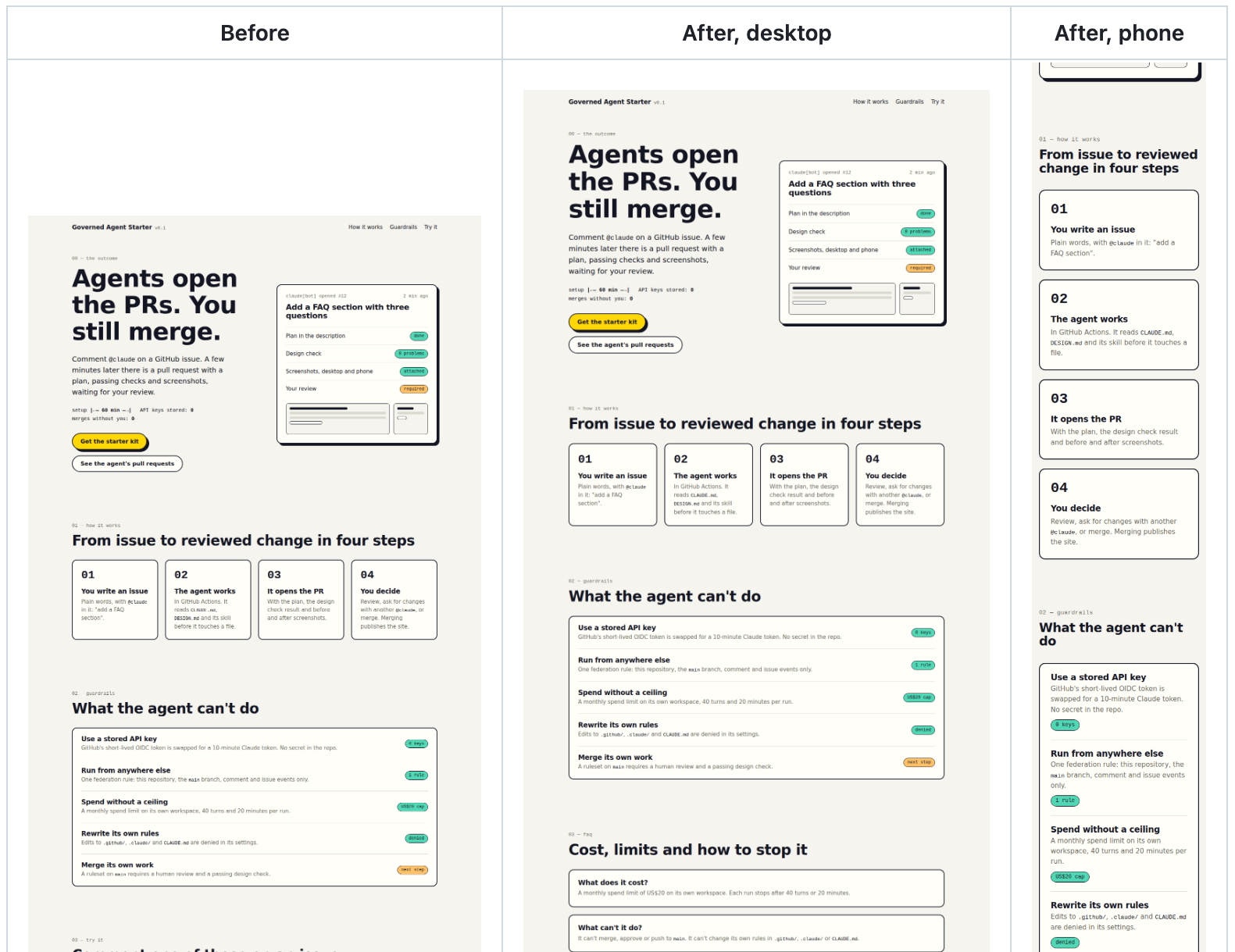
I merged, pages.yml started, and the FAQ was live on the demo site a minute later.
Copy the starter kit, connect your own workspace in steps 1 to 6, and write your first @claude issue.
What the agent can and can't do
| Where it's decided | Setting | |
|---|---|---|
| Get a Claude token | Federation rule | this repository, main, issue and comment events only; 10 minutes |
| Spend | Workspace and workflow | US$20 a month, 40 turns, 20 minutes per run |
| Use tools | --allowedTools |
the design check, read-only git, Playwright, open and update its PR |
| Change its rules | .claude/settings.json |
edits to .github/, .claude/, CLAUDE.md, .mcp.json, scripts/ denied |
| Merge | You | no merge tool; a ruleset that requires your review is the next step |
The federation rule only decides which runs may spend money on Claude. What the agent may do in the repository is set on the GitHub side: the workflow's permissions, the app, the allowed tools and, next, a ruleset on main.
Pitfalls
- The prefilled subject. Anthropic's wizard and docs show
repo:<owner>/<repo>:ref:…. My repository's tokens carriedrepo:<owner>@<id>/<repo>@<id>:ref:…, so the rule refused everything. Print thesubclaim from a real run and copy it. - "Only push" in Allowed events. It's the default, and it refuses every
@clauderun. Use the CEL condition instead. - A refusal for the wrong reason. A deny test that only checks "denied" passed for me while the rule was broken. Read the reason in Authentication events.
- The plan's API credit. A plain API call with the federated token worked, while the agent failed with "Credit balance is too low". Max and Team credit covers the API, the Agent SDK and Managed Agents, not runs of the Claude Code GitHub Action.
- Hidden errors. The action shows only
is_error: truewhen the first call fails, even with debug logging on. Setshow_full_output: truefor one run to see the message, then remove it: the full output is public in a public repo. anthropic_api_keynext to the federation inputs. A static key wins without a warning. Keep the two in separate workflows if you need a fallback.- Edit and Write in
--allowedTools. The action already allows edits inside the repository. Listing the tools allows writes anywhere on the runner. - No pull request, only a link. By default the action posts a "Create a PR" link. Naming
mcp__github__create_pull_requestin--allowedToolsstarts GitHub's MCP server, and the skill tells Claude to use it. - Relative screenshot paths. Playwright MCP saves a relative file name in the workspace root, not in
--output-dir. The skill usesscreenshots/<issue>-before-desktop.pngso the files land in the commit. - Merging the workflow before the variables exist. The first run fails at the variable check. Add the variables, then re-run. The run badge on GitHub kept showing "queued" long after the job had failed; open the job and read its steps.
FAQ
Can I use my Claude Max or Team plan's API credit for this?
No. Anthropic counts runs started by the Claude Code GitHub Action as Claude Code usage, which the included API credit doesn't cover. Buy a small amount of credit for the organisation and keep the workspace cap. The included credit still pays for your own API, Agent SDK or Managed Agents work.
What happens when the agent reaches the US$20 limit?
Its requests fail and the run ends with an error. Nothing is merged and nothing is published. The limit resets on the first of the month, or you raise it in the Console.
Why not store an API key as a repository secret?
A key is simpler and works with any workflow. It stays valid until you revoke it and works from any machine. A token from this rule lasts 10 minutes, and only a run from this repository, branch and event can get one. The four IDs in the repository are useless to anyone else.
Can the agent change its own rules?
Not through its tools: edits to .github/, .claude/, CLAUDE.md, .mcp.json and scripts/ are denied, and it has no tool to merge. The app still has write access to the repository, so the next step is a ruleset on main that requires your review and the design check, plus code owners for .github/.
Can I use this for something bigger than a static site?
Yes. The rule only decides which runs may call Claude. Widen the allowed tools for your build and test commands, and add one rule per new purpose (a pull request review, a scheduled run) instead of loosening this one.
Sources
- Use WIF with GitHub Actions and Workload identity federation, Claude Platform docs
- API credits for Max and Team plans, Claude Help Center, with the FAQ on the GitHub Action
- API credits for Max and Team plans, Claude Platform docs
- anthropics/claude-code-action, the action's inputs and modes
- governed-agent-starter, every file named above
On the blog
- Guardrails for Coding Agents on GitHub: plan templates, read-only tokens, environments and hooks for any coding agent.
History
- 20 Oct 2026 First version.
Hand GitHub issues to Claude with no API key and a US$20 cap
Write @claude in a GitHub issue and get a pull request with a plan, a design check and screenshots; merging publishes the site. About an hour to set up: a Claude Console workspace with a spend cap, a federation rule instead of an API key, four repo variables and one workflow.
I keep each use case current and add new ones as I build them. Get them by email, nothing else.
Subscribe