
At a glance
For: CIOs, IT leads and engineering leads rolling out Microsoft Copilot, GitHub Copilot or Claude · Setup time: 90 days from the first mail to a measured decision · Stack: the AI tools you already license, a one-page AI policy, SSO, DLP, the vendor's usage metrics
Last verified: 2026-11-01
In 90 days you go from "we bought licences" to a decision you can defend. You know which tools may see which data, most of your people use AI every week for real work, and four numbers show whether it pays. Below is the plan, week by week, with what ten companies that scaled did, mission texts to copy and the checklists I use.
The problem: companies buy AI and can't show a result
Most companies buy AI, few get anything out of it. McKinsey's 2026 survey finds 88% of companies using AI and 44% scaling it. MIT NANDA found about 95% of enterprise AI pilots deliver no measurable profit and loss impact. Gartner reports that 40% of companies pilot Microsoft Copilot and 5% roll it out further. BCG attributes 70% of AI success to people and processes, 20% to data and technology and 10% to the algorithm.
Meanwhile the data leaves through the side door. A LayerX report found that 77% of enterprise AI users paste data into chatbots, 22% of those pastes contain personal or payment card data, and 82% come from unmanaged personal accounts that IT never sees. IBM's 2025 breach report found that 97% of organisations with an AI-related breach lacked proper AI access controls.
So a rollout without a plan costs you three times: licences nobody uses, data in private accounts, and code nobody can judge.
Why the obvious fixes fail
Licences and a kickoff mail. What I saw at an MSP and at the enterprise clients I coached: leadership approves Copilot, licences go out, a mail links to the vendor docs, and everyone assumes adoption will happen. It doesn't. A proactive minority, maybe 10 to 15%, finds real use cases. The silent majority uses the tool as autocomplete or not at all, because nobody showed them where it fits their own work.
A ban. People keep using AI, on personal accounts where none of your controls apply. A ban nobody enforces protects no data.
Counting logins. Jellyfish and Faros report companies with 70% adoption and no effect at company level. Usage tells you people opened the tool, not what changed. It gets worse when usage becomes the target: Fortune reports token leaderboards at several companies, and Uber burning through its 2026 token budget in four months.
The same training for everyone. The silent majority leaves it using the tool exactly as little as before.
I use Copilot and Claude Code every working day, mostly for infrastructure as code. For this plan I compared how ten companies that scaled AI tooling went about it, and kept what they all did.
What Shopify, Siemens, UBS and others did
| Company | What they did | Result they report |
|---|---|---|
| Shopify | CEO memo: "Reflexive AI usage is now a baseline expectation." AI questions in performance reviews; new hires only when a team shows AI can't do the work | The mission applies to leadership too |
| Zapier | Four fluency levels from Unacceptable to Transformative; Capable is the minimum for new hires; guild members spend 30–40% of their time on it | 100% usage, documented "golden paths" per function |
| Allianz | AllianzGPT for everyone without a request; Claude Enterprise and Copilot on request; a training path for leaders | 60,000 active users, 95% of them weekly |
| UBS | 55,000 Microsoft 365 Copilot licences, about 600 champions and ambassadors | 280 active use cases |
| Siemens | 8-week feasibility study with 6 teams, then a 14-month rollout to 30,000 developers; training in three levels; 200 key users | "Gain exceeds the cost" |
| Swiss Post | Copilot Chat for all, 3,000 full licences, an enablement session every two weeks | 30–50 sessions with up to 300 people |
| ANZ Bank | 6-week experiment with 100 developers and a control group, then rollout to 1,000 | 42% faster on the same tasks |
| Booking.com | Two-day workshops on real problems, regular office hours | Developers using AI 12+ days a month: 31% more throughput |
| Spotify | Enablement through the platform: tools via MCP, a background agent, linting as feedback to the agent | 99% weekly use, 76% more pull requests |
What the independent studies show
The table above holds what companies say about themselves. ANZ's 42%, for one, comes from volunteers timing themselves on Python exercises. Studies with outside checks find smaller and more uneven effects.
| Study | Who | Result | Limit |
|---|---|---|---|
| Cui et al., 2025 | 4,867 developers at three firms, randomised | 26% more completed tasks, standard error 10 points | Each single experiment is noisy |
| METR, Feb 2026 | Experienced open-source developers | 18% and 4% less time, both with intervals that include zero | METR calls it "only very weak evidence" |
| UK government, 2025 | 20,000 civil servants | 26 minutes a day saved | Self-reported, no control group |
| HMRC, 2026 | 3,000 staff picked at random | About 60 minutes a week saved | Self-reported |
| UK trade department, 2025 | 1,000 staff | Most saved time; no evidence of higher productivity | 70% volunteers |
| Humlum and Vestergaard, 2026 | Danish workers and workplaces | No effect on earnings or hours; effects above 2% ruled out | Pay and hours, not task quality |
Time saved on a task is real. It doesn't reach the company's numbers by itself, so the plan measures before and after, against a group that hasn't started yet.
Five things the scaled rollouts share
The examples above differ in size and tools, and none published its whole plan. These five steps keep coming back. Open one to see what it takes.
1. A mission people can repeat, signed from the top
DORA 2025 names a "clear and communicated AI stance" as the first of seven AI capabilities. It measures what people perceive, in four parts: is using AI expected, does the organisation support experimenting, is it clear what's permitted, and does it apply to their role. The test is whether ten people picked at random can answer those four.
At Shopify and Duolingo the CEO signed. The memos I read demand more than they promise. Duolingo shows the limit: when the mission sounds like job cuts, the mood turns. Its April 2025 memo said AI-first and fewer contractors. A month later the CEO wrote "I do not see AI as replacing what our employees do", and AI use later left its performance reviews.
Amazon's guideline for engineers from October 2026 has a line worth borrowing: "If your work does not benefit from current AI tooling, that is a finding, not a failing." The same text says teams not adopting are "falling behind", which critics read as a mixed message. Send mission and enablement together, and say one thing.
2. A baseline from before, and a group to compare with
Without a number from before, you can't show a benefit later. ANZ ran 6 weeks with about 100 volunteers, randomised, with the groups swapping halfway. Siemens ran an 8-week study with 6 teams before its rollout; the published case doesn't describe a control group.
Volunteers flatter the result, because they're the people who want it to work. Staggered access is fairer: give some teams the tool first, keep the others as a comparison, and compare by who was assigned, whether or not they used it.
Sample size limits what you can prove. In the experiments at Microsoft, Accenture and a third firm, the spread in pull requests was larger than the average, partly because many developer weeks show none. A rule of thumb for each group is 16 × (spread ÷ average)² ÷ effect². With spread equal to the average, seeing a 20% effect takes about 400 developers per group. A smaller company won't prove a pull request effect. It can still see the direction, and catch rework going up.
3. Champions with protected time, signed off by their manager
UBS has about 600 champions and ambassadors for 55,000 licences, Siemens more than 200 key users for 30,000 developers. That is roughly 1 in 90 and 1 in 150, so plan for about 1%, and at least one per team. Anthropic's admin guide suggests 2 to 3 per department.
The evidence on time is thin. Section describes 10 to 20% at a 325-person agency, with the manager signing off. Zapier's guild members spend 30 to 40%. Half a day a week is a sensible floor, and the manager's signature is the part that holds. A programme that promises 20% and takes it back after a month dies.
4. Training by role, on real tasks
Siemens trains in three levels, Commonwealth Bank in three paths (leading, working and building with AI). Short live sessions and workshops on real tasks; documents alone don't land. I found no study that isolates what share of training should be live, so this is practice without proof.
- Office staff: their own documents, how to check a result, and the data traffic light.
- Developers: repository instructions, agents, and reviewing AI output.
- Team leads: reading the numbers, protecting time, and deciding what stops. AI brings more work, so something has to go. If AI writes a document and AI checks it, remove the step.
5. Results measured per team, with the cost next to them
At least weekly use counts as adoption. Throughput only counts together with rework and review time, and all of it next to what it cost. Anthropic's admin guide names 70% weekly active users as a target; I found no independent benchmark.
Measure per team. DX warns against using these metrics for individual performance reviews, and in Switzerland the law limits it (step 3). Keep self-reported time savings as a signal only. HMRC's randomly picked staff reported about 60 minutes a week, roughly half of what the volunteers across the UK government reported.
Copy a mission for each audience
One text goes to everyone and carries the data rules. Teams who build things get an add-on, because they can change production as well as a document. A simple way to draw the line: if the output is a document or an answer, it's office tools; if the output is a pull request, it's developer tools.
I found no study that compares rules per audience, so this split is my own design. Each text answers DORA's four questions. Change whatever isn't true for you: a promise you can't keep does more damage than no promise.
Everyone, on Microsoft Copilot or Copilot Chat
From the CEO or CIO, to all staff, including people who handle sensitive client work:
Microsoft Copilot is part of how we work now. We expect you to try it every week on real work: drafts, summaries, meeting notes, research. It won't fit every task, and telling us where it doesn't help is useful.
- What you get: a session on your own tasks within 30 days, a champion in your team, and time to practise.
- What stays yours: you check every result, and you answer for it like anything else you send.
- What never goes in: client data under professional secrecy, health data and other special categories of personal data, passwords and keys. For company data, use only Copilot with your work account. Not sure? Ask in [channel]. If something went in by mistake, tell us there. Nobody gets punished for reporting it.
- What we measure: teams, not individuals. How much you use AI is no part of your appraisal.
- What it means for jobs: we don't yet know how every role will change. When a change affects your role, you'll hear it from us first.
Everyone, on Claude Enterprise
The same text with Claude in the first line, and these lines added under "What never goes in":
Claude reaches other systems only through the connectors IT has switched on. Anything that writes to another system waits for your approval. Yellow data goes in only where IT has approved it for your team.
In the admin settings, that means Tool permissions set to Needs approval for write tools. Yellow data needs the conditions in the traffic light, which comes later in this post.
Developers on GitHub Copilot, on top of the mission
From the head of engineering:
Using AI tools is how we work. Everyone who builds, runs or automates systems uses them deliberately, measures the effect and shares what they learn. We provide the tools instead of banning them. We measure impact, not logins. You own the code you bring in, whoever wrote it.
- Company seats only. Personal Copilot plans can train on your code unless you opt out.
- Every repository carries its rules in
.github/copilot-instructions.mdorAGENTS.md.- The cloud agent opens pull requests. A person approves and merges them, and AI help doesn't shorten the review.
- Only MCP servers on the allowlist.
- Secrets stay out of repositories. Content exclusion doesn't cover agent mode.
- AI credits are a team budget. Talk to your lead before you run agents at scale.
Developers on Claude Code, on top of the mission
Claude Code runs on the developer's machine with their rights, so this text has to set limits the GitHub one can leave to the platform:
Claude Code runs with your rights, so the limits come from us and stay on.
- Managed settings apply, and bypass mode stays off.
- The sandbox is on. No production credentials in a session.
- Every repository has a
CLAUDE.md. Skills live in the repository and get reviewed like code.- Only MCP servers on the managed allowlist. Write tools ask first.
- You own what you merge, whoever wrote it. AI help doesn't shorten the review.
- Parallel agents burn your spending limit fast. Agents that run without you belong in CI, with their own identity, an owner and a budget.
AI and platform team, on top of the developer text
For the people who build what others rely on: agents, connectors, gateways, shared skills.
You build what other people depend on, so a higher bar applies.
- Nothing runs unattended without a named owner and a budget.
- Every agent has its own identity with the fewest rights it needs. No shared admin logins, no personal tokens in pipelines.
- Every new model, connector or tool goes through the same three questions: data class, processing location, contract chain.
- Documents, tickets and web pages are untrusted input. A model that reads them holds no token that can write.
- We log metadata and spend per account, never prompts.
- A person stays in the loop until a test bench covers the step. Only then do we reduce the human part.
- Every agent has an off switch, and someone who knows where it is.
The 90-day plan
The plan runs in three phases, each with an exit test, and it splits teams into two waves so that day 60 gives you a real comparison. Pick the tool steps that match your stack. Agents and office tools can run in the same plan with different texts and different numbers.
| Role | Who | Job in the 90 days |
|---|---|---|
| Sponsor | CIO or CEO | Signs the mission, decides on day 90 |
| Programme lead | One named person | Runs the plan, owns the numbers |
| Security, data protection | CISO, data protection officer | Traffic light, tenant settings, impact assessment |
| Legal, HR, staff representatives | Their usual owners | Consultation, monitoring rules, what it means for roles |
| Admins | Microsoft 365, GitHub, Claude | Settings, budgets, reports |
| Champions | About 1% of the people in scope | Sessions, use cases, the numbers of their team |
Days 0–30: stance, rules and a baseline
By day 30 you have: a signed mission, a one-page policy, the tools set up, a baseline, and teams split into two waves. If one is missing, move the start date.
1. Name a sponsor and a programme lead (week 1)
The sponsor makes the decision on day 90. The programme lead needs real time for this, and one name. Around them sits a small steering group. Microsoft calls it an AI council: business, IT and security, legal, risk and compliance, and HR or change. Add staff representatives, because the vendor guides leave them out.
Write down now how day 90 will work: who decides, on which numbers, and what would make you stop. I found no published numeric gates from a vendor or regulator, so these are yours to set.
Owner: the sponsor. Done when: the group has met and the decision rule fits on one page.
2. Take inventory, including shadow AI (weeks 1–2)
Find out what people already use before you decide anything.
- A no-blame reporting channel: "If you pasted something you shouldn't have, tell us." You need visibility more than punishment.
- A short survey: which tools, for what, which data.
- A list of the agents, low-code apps and connectors that already exist, with an owner for each.
- The rules you're subject to. For Swiss and EU readers: the FADP, the GDPR and Article 4 of the EU AI Act.
Owner: the programme lead, with security. Done when: every tool on the list has an owner and a data class.
3. Bring in staff representatives and legal (weeks 1–2)
AI tools log what people do, so labour law applies before the pilot starts. Have a lawyer check your case; this is the map.
- Switzerland: Art. 26 of Ordinance 3 to the Labour Act prohibits systems meant to monitor behaviour. SECO's commentary names app and web logs among the technical means, and accepts monitoring for other reasons only where it's proportionate. A private agreement can't waive this. Swissmem expects staff consultation to apply to AI.
- Germany: the works council has a say under § 87(1) no. 6 BetrVG on systems that can monitor behaviour or performance. Agree before the pilot.
- Data protection: an impact assessment for high-risk processing (Art. 22 FADP, Art. 35 GDPR).
- EU AI Act: Article 4 asks you to take measures that support AI literacy. Log who was trained, per role, with a date.
Set one rule that holds for the whole plan: usage numbers stay at team level. Microsoft's usage reports hide names by default, and the Copilot Dashboard has a minimum group size of at least five. GitHub and Claude offer per-user data, so limit who can see it. Use it for one stated purpose, such as reclaiming seats, and keep it out of appraisals.
Owner: the programme lead and the champions. Done when: each team knows where it stands.
Owner: legal and HR. Done when: staff representatives are informed and the monitoring rule is in writing.
4. Sort your data into a traffic light (week 2)
Decide by data class, not by vendor. For every tool and every model, ask three questions in order: which data class, where is it processed, and who is in the contract chain. An allow-list of vendor names fails here, because a model from a vendor you never approved can arrive inside one you did, as a subprocessor.
The result is the table at the end of this phase.
Owner: security and the data protection officer. Done when: both have signed it.
5. Write the policy on one page (weeks 2–3)
Approved tools, the data traffic light, a review duty ("AI help doesn't shorten the review"), the reporting channel and the licence rule. The account manager who pastes a client contract into a free chatbot isn't malicious. Nobody told them where the line is.
Add one process rule: every new request for a tool declares its data class and any AI in it, including features bundled into products you already own. That is how AI reaches you without anyone asking.
Owner: the programme lead. Done when: the page is published where people look for rules.
6. Send the mission (week 3)
One sentence from the top plus the rules that apply to the reader, using the texts above. Add the date of their first session and the name of their champion, so enablement arrives with the mission.
Owner: the sponsor. Done when: a week later, ten people picked at random can say what's expected, what's allowed and where to get help.
7. Microsoft Copilot: close oversharing first (weeks 2–4)
Copilot shows people what their permissions already allow, so old sharing mistakes surface at once. Microsoft 365 Copilot is now named Microsoft Copilot, and the paid licence lists at US$30 per user a month, paid yearly. Copilot Chat comes without access to Microsoft Graph and your work data.
- Use SharePoint Advanced Management, included with the licence, to find overshared sites.
- For sites you can't clean in time, turn on Restrict content from Microsoft Copilot. Permissions stay as they are. Large sites can take over a week.
- Add a Purview DLP policy for the location Microsoft 365 Copilot and Copilot Chat with the action Prevent Copilot from processing content. Check your licences: label rules need E5.
- Check three settings on an EU or EFTA tenant, which includes Switzerland: AI providers operating as Microsoft subprocessors (Anthropic's models, default No users), Copilot in Microsoft 365 apps with Anthropic models, and Flex routing during peak load periods. The last two are on by default for tenants created after 25 March 2026. Anthropic's models sit outside the EU Data Boundary, and flex routing can run inference in the US, Canada or Australia at peak times.
- Decide who may build and share agents, in Agent settings and with Copilot Studio authors. Start with a pilot group.
- Open the Copilot Dashboard and the usage report under Reports > Usage, so you know what you'll get on day 60.
Owner: the Microsoft 365 admin, with security. Done when: a test user sees no overshared site, and all three settings match your traffic light.
8. GitHub Copilot: set budgets and policies (weeks 2–4)
GitHub Copilot Business lists at US$19 and Enterprise at US$39 per seat. Each seat includes 1,900 or 3,900 AI credits a month, pooled across the company, at US$0.01 each. Since June 2026 use is metered by tokens, so agents show up on the invoice.
- Decide on AI credits paid usage, which is on by default. Budgets per user are a hard stop. A cost-centre budget stops nothing unless you tell it to; otherwise, in GitHub's words, "charges continue to accrue without a cap".
- Review the Copilot in the cloud policy and which models are allowed.
- Set the MCP allowlist in
managed-settings.json, the method GitHub recommends. Its custom registry is a preview. - Treat content exclusion as a convenience: GitHub says it's "not supported in Edit and Agent modes".
- Put
.github/copilot-instructions.mdorAGENTS.mdin every repository in scope. Organisation instructions don't reach local client sessions. - In the EU, turn on Restrict Copilot to data residency compliant models if you use data residency. It's off by default, and there's no Swiss region.
- Turn on the Copilot usage metrics policy.
My post on Guardrails for Coding Agents on GitHub has the repository side: plan templates, read-only tokens and approval gates.
Owner: the GitHub admin. Done when: every team has a budget, and the metrics dashboard shows data.
9. Claude: managed settings and spending limits (weeks 2–4)
Claude Enterprise lists at US$20 per seat plus usage at API rates, with a 20-seat minimum. SCIM, audit logs, the Compliance API and custom retention sit in that plan. Anthropic's own average for Claude Code is about US$13 per developer per active day, or US$150 to 250 a month, and agent teams use several times more.
- Set organisation and per-user spending limits before the first session. Start low.
- Enable connectors one by one, and set write tools to Needs approval under Tool permissions.
- Roll out Claude Code settings under Organization settings > Claude Code > Managed settings, or as
managed-settings.jsonthrough device management, which is stronger. - Set
permissions.disableBypassPermissionsMode,allowManagedHooksOnlyandallowManagedMcpServersOnly. - Turn the sandbox on with
sandbox.enabled. It's off by default. - If you run through Amazon Bedrock, Google or Microsoft Foundry, use the file: server-managed settings are bypassed there.
- Export usage with
CLAUDE_CODE_ENABLE_TELEMETRY=1. Prompts stay redacted unless someone setsOTEL_LOG_USER_PROMPTS=1, so leave that off.
Owner: the Claude admin. Done when: a test user can't switch the settings off, and a limit stops a run.
10. Measure the baseline and split the waves (weeks 3–4)
Measure before anything changes, and write down how you compute each number, so day 60 uses the same query.
- Share of people using AI at least weekly, from the vendor's usage metrics.
- Pull requests per developer and month.
- Time to merge.
- Rework after review.
- A ten-minute survey: usage, trust, biggest obstacle, and the four DORA questions.
- For office staff: three recurring tasks per team, and how long they take today.
Split the teams into two waves before anyone volunteers, by lot or from an agreed list. Wave 1 starts on day 30, wave 2 on day 60.
Owner: the programme lead. Done when: you have the numbers per team, and every team knows its wave.
11. Name the champions (week 4)
One per team, about 10% of their time in writing, an AI share in their annual goals, and a job: collect use cases, run sessions, measure their team. Zapier's Philip Lakin: "When everyone's responsible for something, no one's responsible for it."
Owner: team leads. Done when: every manager has signed the time off.
12. Switch on the licence rule (week 4)
Seats unused for 30 days get a reminder; after another 30 days they go back to the pool. GitHub has no reclaim button for this: its docs show a workflow you build yourself over last_activity_at, and a removed seat frees up in the next billing cycle.
Owner: the admins. Done when: the rule runs on its own, and its one purpose is written down.
The traffic light from step 4. The same rules apply to every US-hosted AI service.
| Data | Light | Where it may go |
|---|---|---|
| Public data, open-source code, internal code, IaC and docs without personal data or secrets | Green | Business plans with SSO and no training on your data |
| Internal business secrets, employee data in content, pseudonymised client data | Yellow | Enterprise plans with retention control and a data protection impact assessment, or the same models in an EU region (for example Claude on Amazon Bedrock EU) |
| Client data under professional secrecy, special categories of personal data, secrets and credentials | Red | Not into a US-hosted service: anonymise first, use Swiss hosting, or your own infrastructure |
An EU region moves yellow to green. It doesn't move red: the provider is still a US company and the CLOUD Act still applies. Residency and sovereignty are two different things. Client data under secrecy goes into no prompt; if an app needs it, the app reads it through a connector in your own systems, and no model sees it. The details for Swiss companies are in my post on the EU AI Act and the Swiss stance.
Days 30–60: wave 1, while wave 2 waits
By day 60 you have: wave 1 using AI every week on real work, a library of use cases per team, and a first comparison with wave 2.
13. Prove the setup on the champions (week 5)
Before wave 1 starts, every champion runs a real task on the real setup. Whatever fails here would have failed for everyone. The same model behaves differently in GitHub Copilot and in Claude Code, because instructions, skills, hooks and context handling differ, and you don't want to train people on a tool that isn't configured.
Start with one person's work, then turn what held up into shared instructions and skills. My use case on infrastructure as code shows what the repo side looks like. GitHub's own adoption guide starts onboarding 45 days before the licences go out, with announcements at 14 days and a workshop at 7.
Owner: the champions. Done when: each champion has finished a real task, and the fixes are in the shared setup.
14. Start wave 1 with workshops on real tasks (weeks 5–6)
Groups of eight to ten people, from one team or a mix.
- One-day workshop on their own tasks, not on demos.
- Office hours every week.
- A "stuck" channel and a channel for demos.
- Pair each person with a champion for one afternoon. The over-the-shoulder moment does more than any document.
- Reminders. In Microsoft's experiment, 8.5% of developers signed up in the first two weeks, until reminder mails went out.
Office staff start where the tool is strongest. In the UK trade department's trial, people using Copilot for reviewing, summarising and drafting were more satisfied; those using it for slide decks or scheduling meetings were less so.
Owner: the champions and the programme lead. Done when: everyone in wave 1 has done a workshop and an afternoon with a champion.
15. Build a use-case library (weeks 6–8)
Per team, the three to five tasks an agent takes over, each with its prompt and repo setup. This becomes your training material and your proof.
Go through each process in the same order: understand it, add AI with a person in the loop, and reduce the person only where a test bench covers the step. Redesign while you're there, instead of bolting AI onto the old process.
Owner: the champions. Done when: every team in wave 1 has three tasks in the library.
16. Check the meters and the review queue (week 8)
Usage-based tools spend with nobody watching, so look at cost per team now.
- Compare spend with the budgets from steps 8 and 9.
- Give every unattended agent an owner and a budget, or switch it off.
- Reduce local agents on auto-approve. They carry the developer's full rights, which makes them the largest blast radius you have. Prefer a path from work item to cloud agent to pull request.
- Look at the review queue. A working paper on 718 firms found 30% more code, reviews taking 49% longer, and no measurable rise in finished work; it isn't peer-reviewed yet. GitHub's advice for agent pull requests: ask for a smaller one when the diff touches more than five unrelated files.
Owner: the programme lead and the admins. Done when: nothing runs without an owner, and review time is on the same page as throughput.
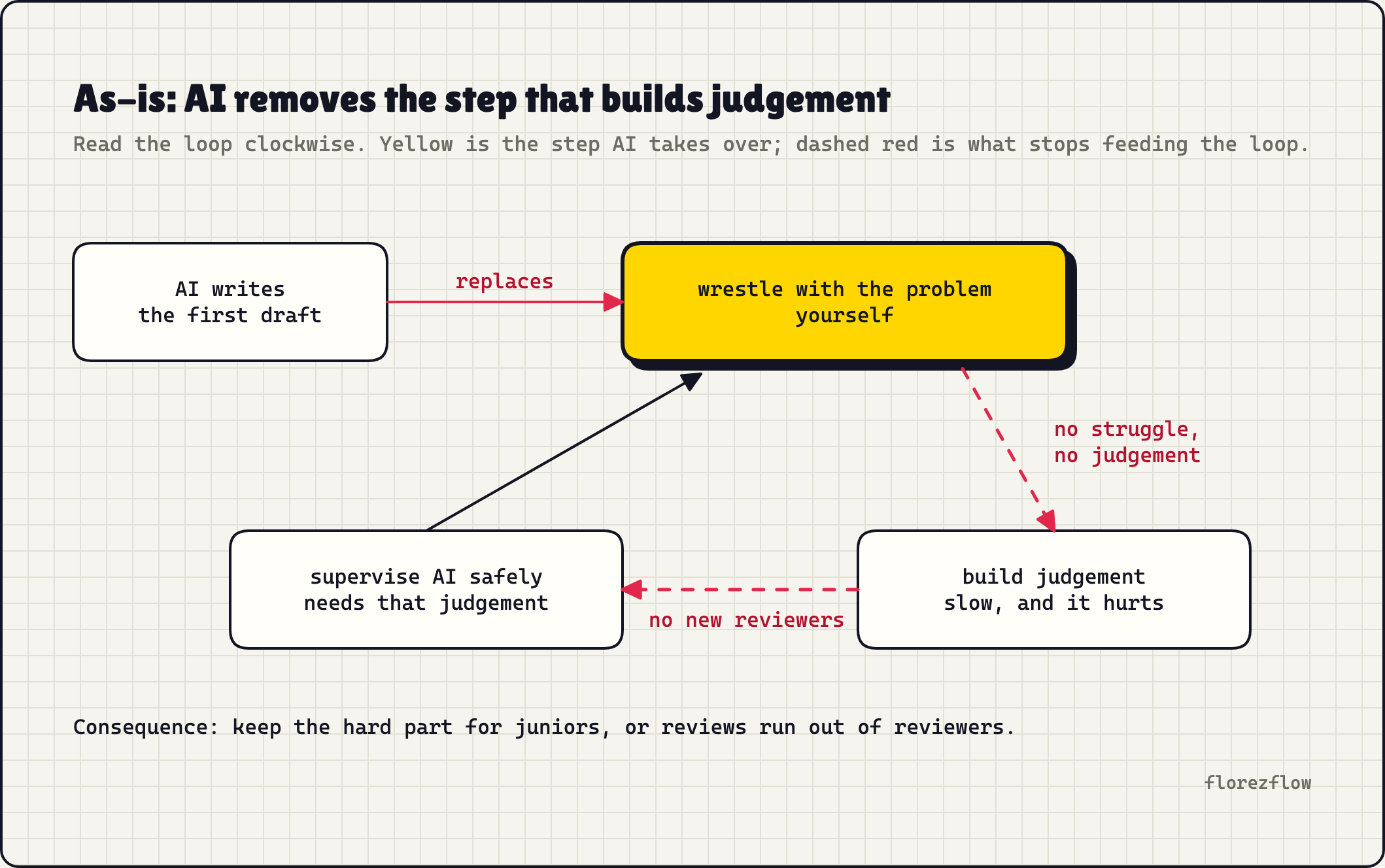
17. Protect quality and judgement. The evidence on AI-generated code is mixed. GitClear's 2026 analysis of 623 million changes shows refactoring down about 70% against 2022 and duplicated blocks up 81% since 2023. DORA 2025 finds throughput rising with AI adoption while delivery stability still drops. Faros warns that without stronger review and tests, more AI means more code, 54% more bugs and five times longer reviews.
Reviewing AI output critically is harder than slowly writing the same output yourself. Juniors who skip the hard parts plateau early, and seniors lose the entry-level work that trained their successors. In Anthropic's January 2026 study, juniors who learned a new library with AI scored 50% on the comprehension quiz, the others 67%. Stanford's payroll data shows the entry door narrowing as well: in the most exposed jobs, the gap for 22 to 25 year olds has reached 19%, which the authors call descriptive, not causal.
- A human owns every merged line. No bulk approvals of AI pull requests.
- Reviews that test understanding: "Walk me through why this works."
- No-AI exercises for juniors on debugging and reading unfamiliar code.
- Track churn and duplication per repo, and fail CI above a ceiling.
Days 60–90: measure and decide
By day 90 you have: a comparison between the waves, the cost per active user, and one page that says roll out, adjust or stop.
18. Compare the waves, then start wave 2 (weeks 9–10)
On day 60, take the same four numbers and the same survey, with the same queries, for both waves. Compare each wave with its own baseline, then the two changes with each other. Count everyone assigned to wave 1, including people who never opened the tool. Throughput without rework and review time tells you nothing.
Below about 400 developers per wave, a pull request effect only shows a direction. For office staff, repeat the three timed tasks and ask what the saved time went to.
Then wave 2 starts, with the library, the champions and everything wave 1 got wrong already fixed.
Owner: the programme lead. Done when: the comparison is written down and wave 2 has had its first workshops.
19. Define fluency levels (week 11)
Adapted from Zapier's levels and GitHub's adoption phases:
- Completion and chat.
- An agent in a set-up repo.
- Hands-off work through issues and automated runs.
- Builds setups for others.
A realistic target for the next quarter: every developer at level 2, every champion at level 4. Use this as a map for people and teams, and keep it out of appraisals.
Owner: the programme lead and the champions. Done when: each team knows where it stands.
20. Work out the cost per active user (week 12)
Divide everything by the people who actually use it, not by the seats you bought.
cost per active user =
  ( seats
  + usage
  + training hours × rate
  + programme staff )
  ÷ active users

yearly value =
  active users
  × hours saved a week
  × working weeks
  × loaded rate
  × share of saved time
    that goes to other work
The last factor decides it, and nobody has published a reliable figure, so state your assumption. The Australian Treasury put break-even for Copilot at 13 minutes a week. At US$30 a month and an assumed loaded rate of US$100 an hour, it's about five minutes. A licence pays for itself quickly on paper. The harder question is whether those minutes turn into anything, and the Danish register data says that doesn't happen by itself.
Owner: the programme lead, with finance. Done when: finance accepts the assumptions.
21. Decide on one page (week 13)
Decide in two steps. First the knock-outs: prompts stay inside your boundary and don't train models, access runs through SSO and a limited group, data and code stay in your systems or can be exported in full, nothing goes live without human approval, and IT can see and stop every app or agent. A tool that fails one is out, however good it scores. That's why weighted vendor scorecards rarely change a result.
Then the numbers, against the rule you wrote down in step 1, using the table below. The page holds your criteria, baseline, second measurement, the comparison between waves, cost per active user, the legal status, the decision, an owner and the next review date.
Owner: the sponsor. Done when: the page is signed and you've said out loud which of the three it is.
| Number | Roll out | Adjust | Stop |
|---|---|---|---|
| Weekly active use | At your target (Anthropic names 70%) | Below it and rising | Below it and flat |
| Throughput against wave 2 | Up | Flat | Down |
| Rework and review time | Flat or down | Up, with throughput up | Up, with throughput flat |
| Cost per active user | Below the value you can defend | Above it, with spend falling | Above it, with spend rising |
From then on
- Every two weeks, 45 minutes: two demos, one problem.
- Every quarter, a half-day hackathon on a real backlog item.
- Every quarter: metrics to leadership, licences cleaned up, policy checked.
- Every quarter: tenant defaults, subprocessors and new models checked again, because vendors change them.
Two questions the plan doesn't answer for you
Pricing. If AI lets your people do two hours of work in one, billing by the hour halves your revenue for the same outcome, and competitors who use AI well will underbid you. Decide whether you bill by time, outcome, subscription or fixed price, and whether you track delivered output or only hours.
Debt you can't see. AI-generated debt has no author who remembers the shortcut. It spreads as duplication across repos instead of sitting in one legacy module, and the agent copies the patterns it finds, bad ones included. Linters measure the code, not whether anyone understands it. Pick a random file each quarter and ask someone to explain it end to end. Where nobody can, that's your debt map.
Pitfalls
- Licences first, plan later. Sooner or later someone asks what the licences brought, and you have no number to show.
- Trusting how fast it feels. In METR's early-2025 study, experienced developers were 19% slower with AI while believing they were 20% faster. The 2026 update points the other way, with only weak evidence. Either way, measure.
- The vendor dashboard as your only measurement. It counts usage. You need your own numbers from before the rollout.
- Champions without time. A title without hours is a volunteer job, and it ends with the first busy month.
- A mission without enablement, or the reverse. The first scares people, the second leaves them without a direction.
- One kickoff webinar. Monthly sessions and an afternoon next to a champion work; a single session doesn't.
- An allow-list of vendor names. Models from a vendor you never approved can arrive inside a tool you did, as a subprocessor.
- Trusting the defaults. Flex routing and similar settings can differ between an old tenant and a new one, and they change over time.
- Usage as a target. People will hit the number, and the invoice follows.
- A budget nobody owns. Two usage meters can run at once with nobody watching. Name the owner before anything runs unattended.
FAQ
Should we ban ChatGPT and other consumer AI tools?
Block free consumer tiers on company devices and offer approved business tools instead. A ban without an alternative pushes the same data into private accounts.
How many champions do we need?
About 1% of the people you roll out to, at least one per team, each with at least half a day a week signed off in writing.
What should we measure?
Four numbers before and after: the share of people using AI at least weekly, pull requests per developer and month, time to merge, and rework after review. For office staff, replace the middle two with timed tasks. Next to all of them, the cost per active user.
Can't we host our own model instead?
For AI applications that handle sensitive data, often yes. As the backbone for AI-assisted development, no: frontier models can't be self-hosted, and you'd get a model without the tooling around it.
Does the EU AI Act apply to a Swiss company?
Article 4 has applied since 2 February 2025 to anyone deploying AI in the EU, including Swiss firms serving EU clients. Since the Digital Omnibus of July 2026 it asks you to take measures that support AI literacy, instead of guaranteeing a level. More in my post on the EU AI Act and the Swiss stance.
References
- Adoption at scale: McKinsey, State of AI · BCG, what drives AI value · MIT NANDA via Fortune · Gartner Copilot survey · a16z, a counterpoint
- Company examples: Shopify · Zapier · Allianz · UBS · Siemens · Swiss Post · ANZ Bank · Booking.com · Spotify · Duolingo · Commonwealth Bank · Amazon's guideline for engineers · The Register on Amazon's memo · Duolingo and performance reviews · Zapier on accountability
- Independent studies: Cui et al. (full draft) · UK government experiment · HMRC evaluation · UK trade department trial · Humlum and Vestergaard · Australian Treasury · Stanford, Canaries update
- Champions and rollout guides: TNW · Section AI · Microsoft, AI council · Anthropic, Claude Enterprise admin guide
- Measuring: GitHub, driving Copilot adoption · GitHub, adoption cohorts · Jellyfish · Faros via ADTmag · DORA 2025 · DORA AI capabilities model · DORA, clear and communicated AI stance · DORA metrics · DX, measuring AI assistants · Fortune on token budgets · Chen and Stratton, via ComplexDiscovery · GitHub on reviewing agent pull requests
- Quality and skills: GitClear 2026 · METR 2025 · METR 2026 update · Anthropic, AI assistance and coding skills
- Microsoft settings: Anthropic models as a subprocessor · Anthropic models in Microsoft 365 apps · Flex routing · Restricted Content Discovery · DLP for Copilot · SharePoint Advanced Management · Copilot Dashboard · Dashboard settings
- GitHub settings: AI credits · Budgets · MCP management · Content exclusion · Data residency · Reminding inactive users
- Claude settings: Pricing and plans · Claude Code costs · Server-managed settings · Settings reference · Sandboxing · Monitoring · Connectors
- Labour law: SECO on Art. 26 ArGV 3 · FDPIC on workplace monitoring · Swissmem on AI at work · § 87 BetrVG · CMS on works councils and AI
- Shadow AI and security: LayerX via The Register · IBM, Cost of a Data Breach 2025
History
- 1 Nov 2026 The plan rewritten in detail: 21 steps with owners and exit tests, two waves for a fair comparison, settings for Microsoft Copilot, GitHub Copilot and Claude, labour law, cost per active user and a decision table. New mission texts per audience, and the five shared steps as cards. Independent studies added; corrected the champion ratio, the GitHub seat reclaim claim and Article 4. New diagram.
- 17 Oct 2026 New title and section headings that lead with the outcome; the URL stays.
- 16 Oct 2026 Rewritten for IT leaders as a 90-day plan, with the five patterns from ten companies that scaled AI tooling and a data traffic light. New URL; the old one redirects.
- 16 Oct 2026 Turned into a use case: the same arguments and checklists, reordered into a five-step path.
- 25 Sep 2026 Figures checked against the original sources, with newer data from DORA 2025, METR, GitClear and Anthropic.
- 19 Apr 2026 First version, as The Slippery Slope of AI Adoption: A Heavy User's Honest Take.
Roll out AI across your IT team in 90 days and measure if it pays
A 90-day plan to roll out Microsoft Copilot, GitHub Copilot or Claude and measure if it pays: mission texts per audience, a data traffic light, a fair baseline, champions with protected time and a one-page decision. With what Shopify, Siemens, UBS and others did.
A GitHub repo where a coding agent opens pull requests and can't merge without you, plus a one-page sign-off sheet for whoever approves it.
Get the starter kit