
Using
Claude
Last reviewed
My default for writing, architecture and agentic work. The app for thinking, with skills and connectors; Claude Code in the terminal for everything that touches a repo.
My setup at a glance
| Where | What I use it for | What makes it work |
|---|---|---|
| Claude app | Thinking, drafting, reviews | Skills, connectors I switch on when needed |
| Claude Code | Most of my tasks: repos, IaC, scripts, this site | CLAUDE.md per repo, the same skills, plugins |
| Herdr | Running several Claude Code agents side by side | The Herdr skill plus my own skills on top |
The app
Skills
Skills are what I use most in the app. A skill is a folder with instructions (and sometimes scripts) that Claude loads when a task matches, for example my no-ai-slop editing rules or an Excalidraw diagram workflow. I write them once and they sync to my user directory (~/.claude/skills), so the same skills also work in Claude Code.
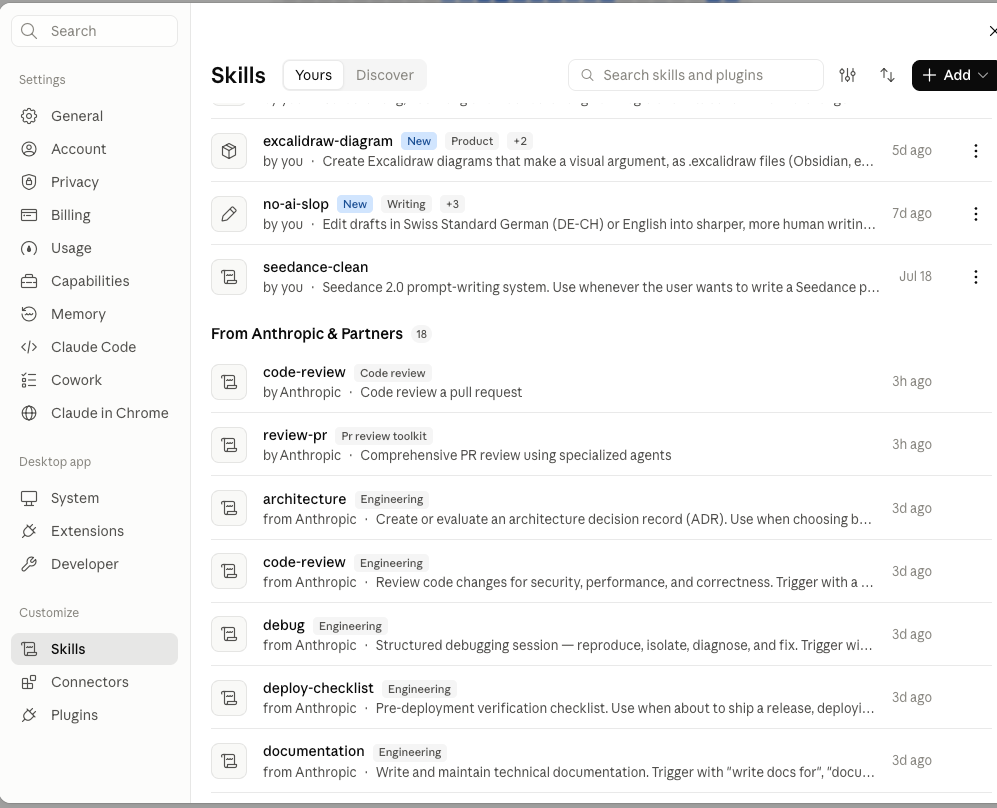
Write the skill once
I keep the house rules for a kind of task in a skill, not in a prompt I paste again. The app and Claude Code then behave the same way, and improving the skill improves both.
Connectors
Connectors give Claude access to other tools and data. They are built on the Model Context Protocol (MCP): a service exposes tools, Claude calls them in the conversation. I add them under Customize → Connectors; some are ready-made (GitHub, Gmail, Context7), others are custom ones I point at my own MCP servers.
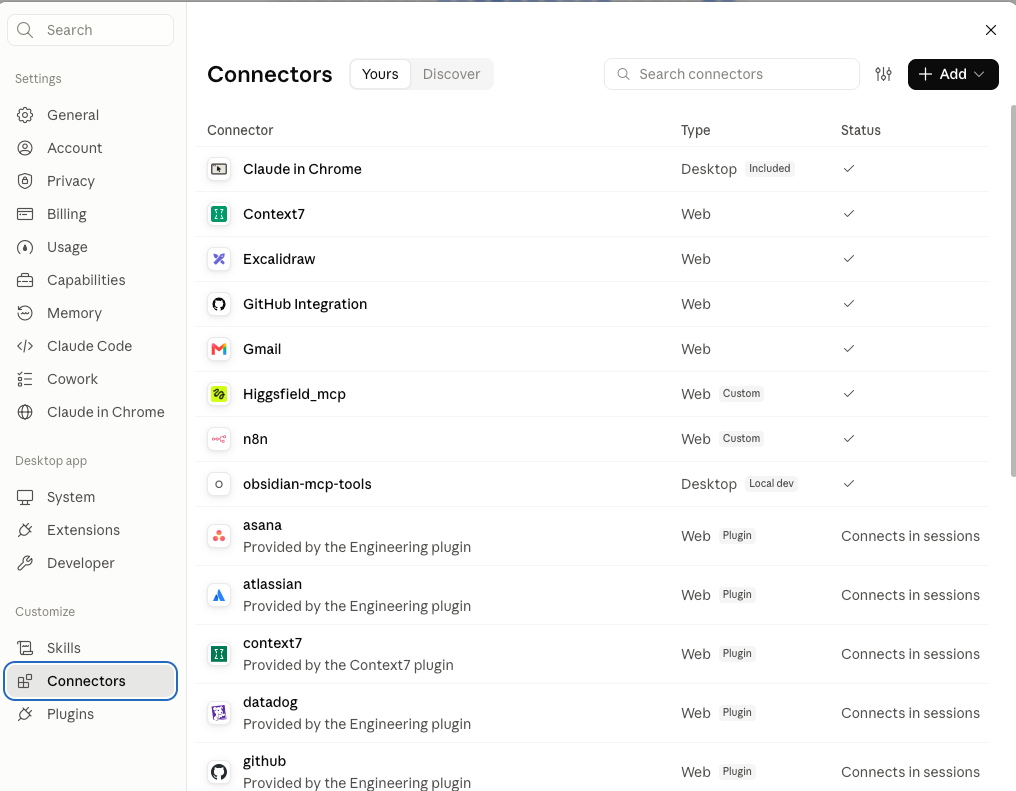
I experiment with connectors a lot, and I switch them off again when I don't need them. Fewer active connectors mean fewer tools Claude can reach for, and less that can go wrong.
Recently I used the n8n connector to refactor complete n8n workflows and test them through the connector, without opening the n8n editor. Every tool of a connector gets its own permission[1], so read-only tools can run freely while anything that writes waits for me.
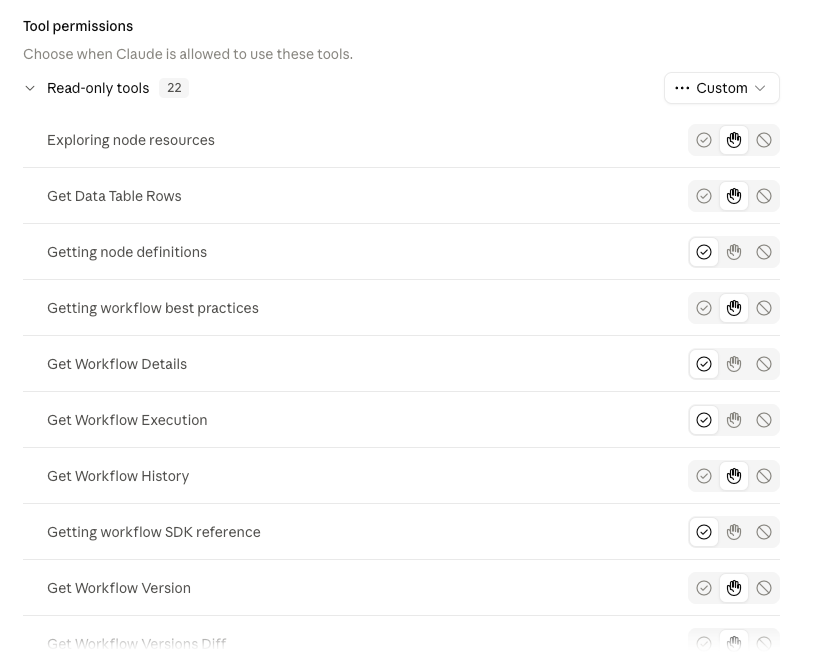
Write tools stay on approval
Tools that create, update, publish or delete stay on "needs approval". Reading a workflow is harmless; publishing one by accident is not.
Claude Code
I use Claude Code for most of my tasks. It runs in the terminal inside a repository and reads, edits and runs things there.
Install on macOS or Linux (updates itself in the background):
curl -fsSL https://claude.ai/install.sh | bash
Or with Homebrew (no auto-update):
brew install --cask claude-code
On Windows, in PowerShell:
irm https://claude.ai/install.ps1 | iex
Start it in the project folder, and check the installation if something looks off:
claude
claude doctor
What every repo of mine gets before I let Claude Code work in it:
- A
CLAUDE.mdwith the conventions: naming, structure, language, what never to touch - Skills for recurring work, in the repo (
.claude/skills) or in my user directory - Permissions that allow the harmless commands and ask for the rest
- Hooks for checks I'd otherwise forget, only where a skill isn't enough
Why CLAUDE.md matters more than the prompt
Claude Code reads CLAUDE.md at the start of every session. A convention written there is followed every time; a convention I only mention in a prompt is followed once.
Herdr on top
For running several agents at once I use Herdr, a terminal workspace for coding agents. Agents inside Herdr can see each other's panes, read their output, wait for a test or another agent to finish, and start helper agents next to them.
curl -fsSL https://herdr.dev/install.sh | sh
Herdr ships an agent skill that teaches Claude Code how to control it. I install it globally, into my user directory:
npx skills add herdrdev/herdr --skill herdr -g
The skill only activates when Claude Code runs inside Herdr (HERDR_ENV=1), so it stays out of the way everywhere else.
My own Herdr skills
On top of the official skill I wrote my own. The main one starts worker agents from a main Claude session:
- one git worktree per worker, so agents never edit the same checkout
- a model per worker, depending on the task
- a briefing file per worker with the task, the constraints and what "done" means
- status checks, answers to a blocked worker, and clean-up after the merge
The main session plans and reviews, the workers implement. That split is where Herdr pays off.
Rules I keep
Boundaries
- No client data in personal accounts or personal connectors.
- I review every change it proposes to infrastructure before it runs.
Links
- Claude Code docs — Install, settings, skills, hooks and MCP.
- Claude Help Center: connectors — How custom connectors on remote MCP work.
- Herdr — Terminal workspace for running several coding agents.
- Anthropic news — Release announcements and research posts.
On the blog
- Infrastructure as Code, Bicep edition: conventions, versioning, pipelines · 02 Jun 2026
- Roll out AI in your company: a 90-day plan for IT leaders · 19 Apr 2026
History
- 25 Sep 2026 Rewritten as my working setup: app with skills and connectors, Claude Code, Herdr.
- 20 Sep 2026 Reviewed. No change.
- 19 Apr 2026 Added as Using.
Always allow, needs approval, or never. Set per tool under the connector's settings. ↩︎